
| 일 | 월 | 화 | 수 | 목 | 금 | 토 |
|---|---|---|---|---|---|---|
| 1 | 2 | 3 | 4 | 5 | 6 | |
| 7 | 8 | 9 | 10 | 11 | 12 | 13 |
| 14 | 15 | 16 | 17 | 18 | 19 | 20 |
| 21 | 22 | 23 | 24 | 25 | 26 | 27 |
| 28 | 29 | 30 |
- libvirt
- kolla
- terraform
- golang
- ceph
- ceph-ansible
- nfs-provisioner
- grafana-loki
- cephadm
- cloud-init
- Kubeflow
- kolla-ansible
- k8s
- KVM
- archlinux
- yum
- Docker
- Arch
- ubuntu
- repository
- Kubernetes
- HTML
- pacman
- port open
- Ansible
- Linux
- awx
- OpenStack
- i3
- Octavia
- Today
- Total
YJWANG
Linux에서 설정해보는 GRE 터널 본문
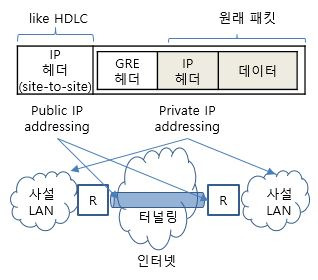
GRE Generic Routing Encapsulation
  ㅇ 원격 네트워크가 마치 로컬 네트워크인 것처럼 보이게하는 터널링 프로토콜
     - 임의 계층 프로토콜의 캡슐화가 가능케하여 이를 라우팅할 수 있도록 설계됨
쉽게 표현하면 통신할 수 없는 사설 IP간에 통신할 수 있게 터널을 뚫어주는 것이다. 기존에 다른 VPN 관련 기술을 접해봤던 분이라면 어렵지 않게 이해하실 수 있습니다.
간단하게 두 Linux Server를 가지고 구성하여 이해를 돕겠습니다.

우선 두 Server는 172.31.0.0/20 서브넷에 같이 위치하고있으며 서로간의 통신은 문제가 없습니다.
이러한 환경에서 GRE를 활용하여 10.99.99.0/16 가상 사설 네트워크를 오버레이로 구성하여 통신 가능하도록 설정해보고자합니다.
Host A (172.31.40.237)
- gre mode로 tunnel 인터페이스를 생성하고 IP를 지정합니다.
[root@ip-172-31-40-237 ~]# ip -o -4 a
1: lo    inet 127.0.0.1/8 scope host lo\       valid_lft forever preferred_lft forever
2: ens5    inet 172.31.40.237/20 metric 512 brd 172.31.47.255 scope global dynamic ens5\       valid_lft 2582sec preferred_lft 2582sec

[root@ip-172-31-40-237 ~]# ping 10.99.99.2
PING 10.99.99.2 (10.99.99.2) 56(84) bytes of data.
^C
--- 10.99.99.2 ping statistics ---
11

[root@ip-172-31-40-237 ~]# ip tunnel add gre1 mode gre remote 172.31.3.63 local 172.31.40.237 ttl 25
[root@ip-172-31-40-237 ~]# ip addr add 10.99.99.1/16 dev gre1
[root@ip-172-31-40-237 ~]# ip link set dev gre1 up

[root@ip-172-31-40-237 ~]# ping 10.99.99.2 -c 3
PING 10.99.99.2 (10.99.99.2) 56(84) bytes of data.
64 bytes from 10.99.99.2: icmp_seq=1 ttl=127 time=0.980 ms
64 bytes from 10.99.99.2: icmp_seq=2 ttl=127 time=0.976 ms
64 bytes from 10.99.99.2: icmp_seq=3 ttl=127 time=0.980 ms

--- 10.99.99.2 ping statistics ---
3 packets transmitted, 3 received, 0% packet loss, time 2002ms
rtt min/avg/max/mdev = 0.976/0.978/0.980/0.002 ms
Host B (172.31.3.63)
- gre mode로 tunnel 인터페이스를 생성하고 IP를 지정합니다.
[root@ip-172-31-3-63 ~]# ip tunnel add gre1 mode gre remote 172.31.40.237 local 172.31.3.63 ttl 25
[root@ip-172-31-3-63 ~]# ip addr add 10.99.99.2/16 dev gre1
[root@ip-172-31-3-63 ~]# ip link set dev gre1 up
TCPDUMP
- 이후 GRE 프로토콜로 TCPDUMP를 찍어보면 outer에는 172.31.40.237 > 172.31.3.63 에 GRE 프로토콜로 통신 요청이 있는 것을 볼 수 있고 Inner에는 우리가 원하는 10.99.99.1 > 10.99.99.2: ICMP 통신 기록이 담겨있는 것을 보실 수 있습니다.
[root@ip-172-31-3-63 ~]# tcpdump -vvnne -i any proto GRE
tcpdump: data link type LINUX_SLL2
dropped privs to tcpdump
tcpdump: listening on any, link-type LINUX_SLL2 (Linux cooked v2), snapshot length 262144 bytes
14:33:01.415244 ens5  In  ifindex 2 02:26:57:0d:dc:88 ethertype IPv4 (0x0800), length 128: (tos 0x0, ttl 25, id 49289, offset 0, flags [DF], proto GRE (47), length 108)
    172.31.40.237 > 172.31.3.63: GREv0, Flags [none], proto IPv4 (0x0800), length 88
        (tos 0x0, ttl 127, id 64910, offset 0, flags [DF], proto ICMP (1), length 84)
    10.99.99.1 > 10.99.99.2: ICMP echo request, id 12, seq 1, length 64
14:33:01.415284 ens5  Out ifindex 2 02:10:26:52:39:01 ethertype IPv4 (0x0800), length 128: (tos 0x0, ttl 25, id 44764, offset 0, flags [DF], proto GRE (47), length 108)
    172.31.3.63 > 172.31.40.237: GREv0, Flags [none], proto IPv4 (0x0800), length 88
        (tos 0x0, ttl 127, id 37760, offset 0, flags [none], proto ICMP (1), length 84)
    10.99.99.2 > 10.99.99.1: ICMP echo reply, id 12, seq 1, length 64
이는 테스트 환경으로 Linux에서 만약 실제 구성하신다면 오류 방지를 위해 GRE 헤더 (4바이트) IP 헤더 (20바이트)가 추가되므로 MSS를 기존 값에서 24를 빼고 보내지도록 수정해야합니다. MTU값을 넘으면 fragmentation에 의해 GRE터널링을 통한 통신이 의도치 않게 동작할 수 있습니다.
혹시 optional 필드도 사용한다면 MSS 추가 조정도 고려해야합니다.
https://datatracker.ietf.org/doc/html/rfc2784
    0 1 2 3 4 5 6 7 8 9 0 1 2 3 4 5 6 7 8 9 0 1 2 3 4 5 6 7 8 9 0 1
    +-+-+-+-+-+-+-+-+-+-+-+-+-+-+-+-+-+-+-+-+-+-+-+-+-+-+-+-+-+-+-+-+
    |C|       Reserved0       | Ver |         Protocol Type         |
    +-+-+-+-+-+-+-+-+-+-+-+-+-+-+-+-+-+-+-+-+-+-+-+-+-+-+-+-+-+-+-+-+
    |      Checksum (optional)      |       Reserved1 (Optional)    |
    +-+-+-+-+-+-+-+-+-+-+-+-+-+-+-+-+-+-+-+-+-+-+-+-+-+-+-+-+-+-+-+-+